
This documentation is for a Forgejo version which is not yet released.
To read the documentation for the released version of Forgejo, navigate to the latest version.
The git-pages webhook
git-pages is a third party software project that makes it easy to host static web pages from git repositories in a forge-agnostic fashion. This allows Forgejo administrators and users to replicate much of the functionality of services such as GitHub Pages, GitLab Pages, or Codeberg Pages, the latter of which is powered by git-pages.
This documentation is intended for experienced end-users who understand the basic principles of web hosting. If you’re new to this, we recommend referring to the documentation of your git-pages provider. If you are a Codeberg user and you’re new to Codeberg Pages, see Codeberg Pages documentation instead.
As of version 18.0, Forgejo supports a special webhook type to make setting up static sites on git-pages effortless and intuitive.
Before you start, note that you must push the raw HTML content of your website to the pages branch of your repository to use this webhook.
If you use a static site generator, you must commit the generated output to the pages branch for the webhook. You should also consider using Forgejo Actions to build your site and publish it directly from the source branch using actions/git-pages instead.
To get started, head to the webhook settings in your repository, create a new webhook, and select git-pages from the dropdown. This webhook type is only available for repositories. It is not available for users, organizations, or globally.
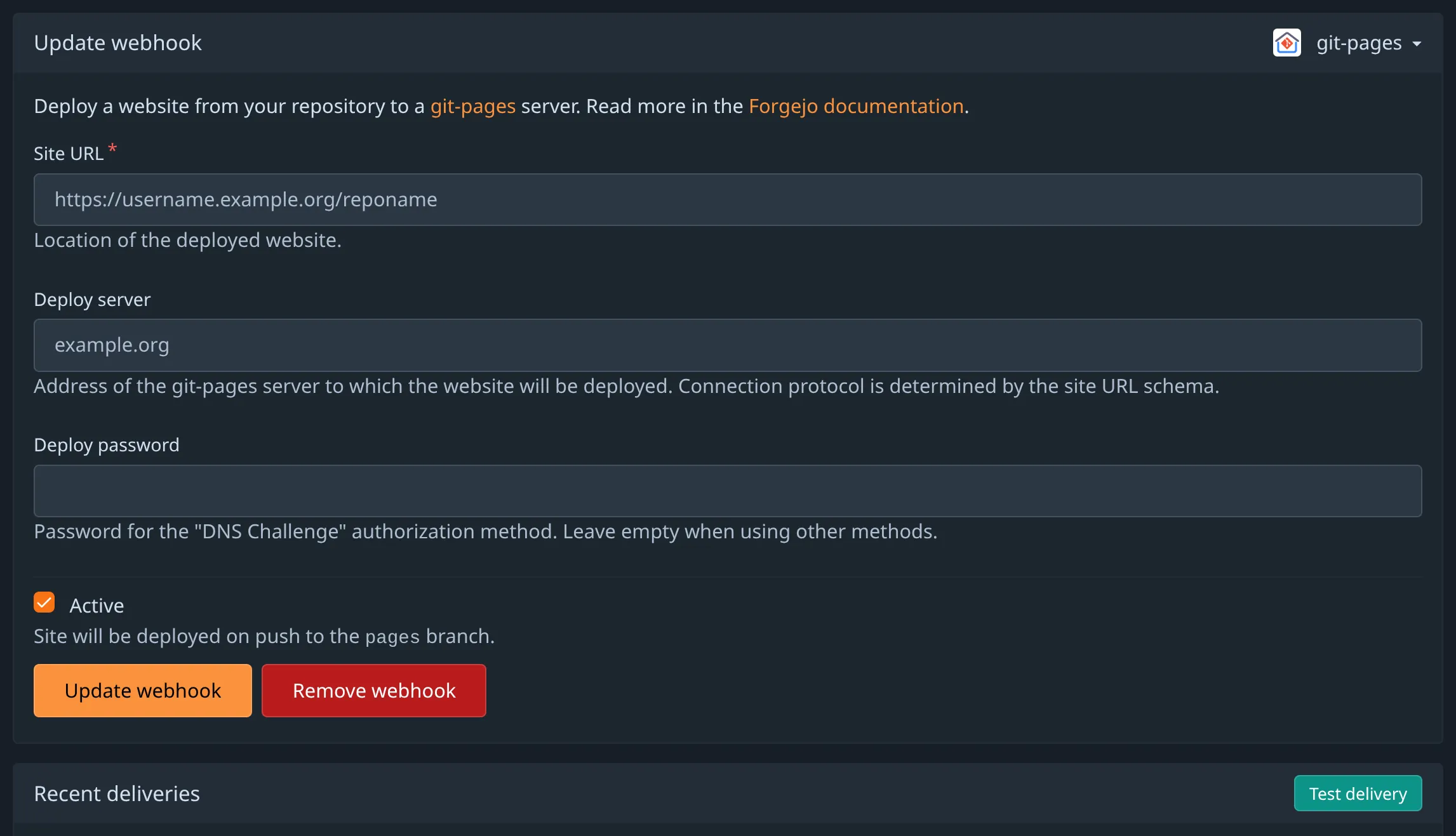
For Site URL, supply the full URL to which you wish to deploy your site (e.g. https://example.org/.)
If you wish to use your own domain, you must ensure this repository is authorized by the domain’s DNS records.
For Deploy server, supply the domain of the git-pages provider you wish to deploy your site to (e.g. grebedoc.dev.)
In most cases, it should be the parent domain of the provided subdomain or the respective CNAME target of your your own domain’s DNS records.
- The Forgejo administrator may also host an accompanying git-pages service and optionally provide subdomains based on your username or organization name.
- If the Site URL field is prefilled, you may proceed to create the webhook without any additional changes to make your site available under the provided subdomain.
- If you wish to host a site at the root of the provided subdomain, you must use a repository named
pages. - If only the Deploy server field is prefilled, your administrator may be hosting a git-pages service that only supports using your own domain, or recommending the use of a third party git-pages provider, such as grebedoc.dev.
Deploy password should be left blank, unless you wish to use the DNS challenge authorization method to avoid having the DNS records reveal the location of the repository.
DNS Allowlist Authorization (recommended)
If you wish to host your site on your own domain, you must configure DNS records so git-pages can verify that your repository is authorized to publish to your domain. Note that it is only possible to deploy your site to the root path of your domain with this authorization method (i.e. https://example.org/ or https://www.example.org/.) If you wish to deploy your site to another path, you must use the DNS challenge authorization method, Forgejo Actions with actions/git-pages, or git-pages-cli.
The authorization record must be a TXT record on the _git-pages-repository (exact name) subdomain of the domain you wish to deploy with the full https git clone URL of your repository. For example, when publishing from https://codeberg.org/username/reponame to https://example.org/, create a TXT record _git-pages-repository.example.org with the value https://codeberg.org/username/reponame.git.
To make git-pages host your site, you must also create a CNAME or A/AAAA records for your domain pointing to the domain or IP address(es) of your preferred git-pages provider. Refer to your git-pages provider’s documentation or Codeberg’s custom domain guide for more detailed assistance with setting up the DNS records.
DNS Challenge Authorization (advanced)
This authorization method may not be supported by git-pages providers that only allow deployments from the local forge, such as codeberg.page.
If you wish to deploy your site to your own domain without revealing the location of the git repository in the DNS records, you may use the alternate authorization method by supplying a deployment password and setting up a challenge record in the domain’s zone. Note that the repository must be publicly visible on the Forgejo instance that sends the webhook. If you wish to deploy from a private repository, you must use actions/git-pages or git-pages-cli.
- Start by generating a random string of 32 or more alphanumeric characters to use as the password.
- Calculate the value of the challenge record by generating a sha256 checksum for the domain and password, separated by a space. On most Unix-like systems, you can use
printf "<domain> <password>" | openssl sha256. You can also use the interactive form at grebedoc.dev to generate the password and calculate the challenge value. - Add a TXT record to the
_git-pages-challengesubdomain of the domain you wish to deploy with the calculated sha256 checksum as it’s value. - Set the Deploy password for the webhook to the password you generated in step 1.
To make git-pages host your site, you must also create a CNAME or A/AAAA records for your domain pointing to the domain or IP address(es) of your preferred git-pages provider. Refer to your git-pages provider’s documentation for more detailed assistance with setting up the DNS records.