This documentation is for a Forgejo version which is not yet released.
To read the documentation for the released version of Forgejo, navigate to the latest version.
FUNDING files
Forgejo supports parsing a FUNDING.yml file found in a repository and presenting its contents in various contexts as donation options for that repository. By default, Forgejo looks for a funding config document in the following directories on the repository’s default branch, in this order:
.forgejo.github- The repository root.
The filename of the funding config is case-insensitive, and may end with either .yml or .yaml (also case-insensitive). The first funding config found is considered the funding config for the repository. Other correctly-named files are not considered, even if the one found contains errors.
A FUNDING.yml document consists of key-value pairs of funding platform names and one or more string values. All Forgejo instances support at least the following funding platform names:
buy_me_a_coffee(Buy Me a Coffee)community_bridge(LFX Mentorship, formerly CommunityBridge)github(GitHub Sponsors)issuehunt(IssueHunt)ko_fi(Ko-fi)liberapay(Liberapay)open_collective(Open Collective)patreon(Patreon)thanks_dev(thanks.dev)tidelift(Tidelift)custom(Custom URL)
At the time of writing, GitHub’s own FUNDING.yml format supports an additional funding provider, polar (Polar). Forgejo has opted not to include Polar support by default. See forgejo/forgejo#13361 (comment) for details. If you wish to add a Polar payment page to your FUNDING.yml, use a custom URL instead.
Most of these accept a simple username or project name string to declare each funding entry. For example:
# FUNDING.yml
ko_fi: example1
liberapay: [example1, example2]
Some platforms have a more complex syntax. For example, thanks_dev requires a format like u/gh/USERNAME, and tidelift requires a pairing of PLATFORM-NAME/PACKAGE-NAME, where known-valid platform names include npm, pypi, rubygems, maven, packagist, and nuget.
# FUNDING.yml
thanks_dev: u/gh/example1
tidelift: npm/example1
Repository authors may add other custom donation URLs with custom:
# FUNDING.yml
custom: 'https://example.com/example1'
Instance administrators may define other funding platforms for use on their Forgejo instance.
The funding config may declare multiple entries for any given platform by providing a list of string values. For example:
# FUNDING.yml
ko_fi: [example1, example2]
custom:
  - 'https://example1.example.com'
  - 'https://example2.example.com'
A funding config may declare up to 15 total entries by default.
Sponsor button
When the repository contains a funding config with at least one valid entry, a “Sponsor” button appears near the top-right corner of the project page:

Selecting this button presents a modal which directs users to the various funding platforms described in the config:
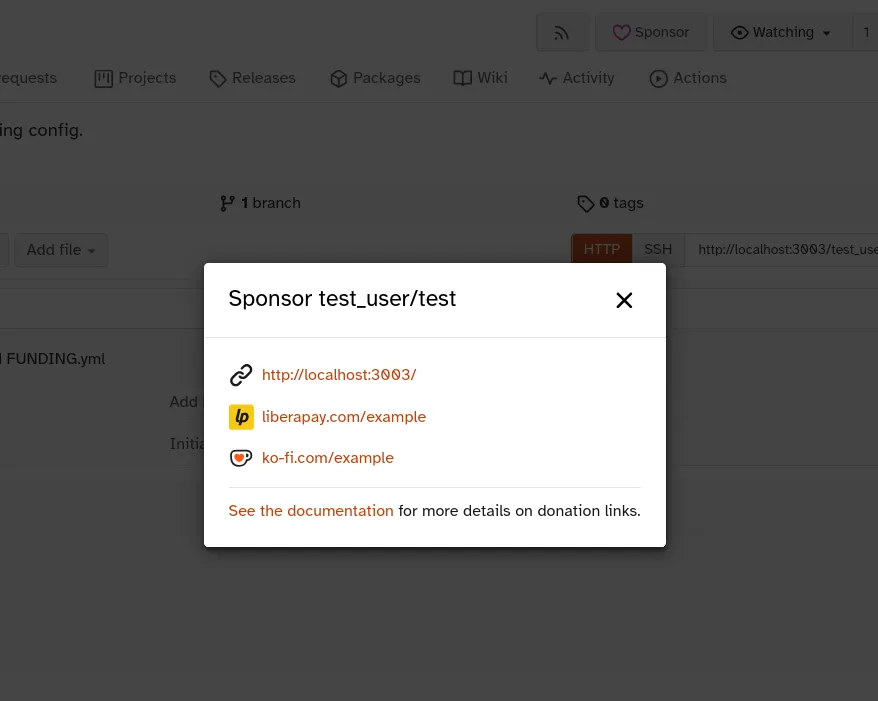
The funding config used for the above example is as follows:
# FUNDING.yml
custom: 'http://localhost:3003/'
liberapay: example
ko_fi: example
Errors
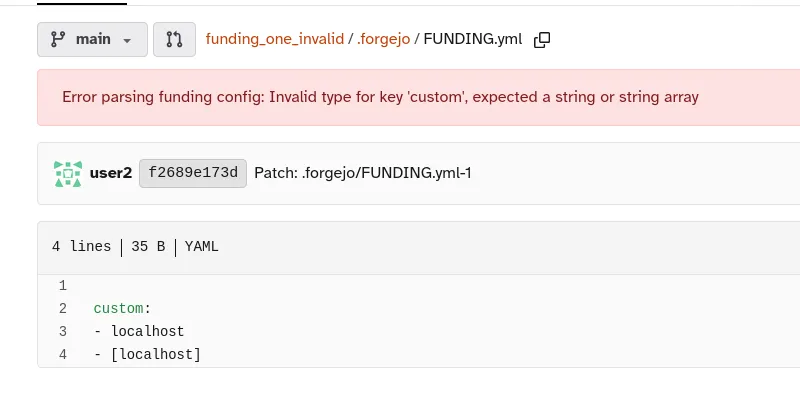
If Forgejo cannot understand one or more entries in a funding config, the error(s) are presented at the top of the file’s web view. Affected entries are not shown in the Sponsor modal. If the funding config contains no valid entries, the Sponsor button does not appear.